GitHub Actions macOS Runner
Use as a self-hosted macOS runner for GitHub Actions workflows. Dramatically reduce macOS build minutes and costs while getting consistent Apple Silicon performance.
Self-Hosted Apple Silicon Runner for iOS & macOS Builds
Run your GitHub Actions workflows on a dedicated macOS runner powered by Apple M4. Self-hosted macOS runner with full SSH access — integrates with GitHub Actions, Jenkins, GitLab CI, and Fastlane. Real Apple Silicon hardware, no virtualization, no shared resources.
Up to 5x faster builds compared to GitHub-hosted macOS runners
Use your dedicated macOS runner as a self-hosted runner for GitHub Actions, GitLab CI, Jenkins, and every major CI/CD platform.
Use as a self-hosted macOS runner for GitHub Actions workflows. Dramatically reduce macOS build minutes and costs while getting consistent Apple Silicon performance.
Register as a GitLab Runner with shell or SSH executor. Run your .gitlab-ci.yml pipelines on a dedicated macOS runner with real Apple Silicon and full GPU access.
Configure as a Jenkins build agent via SSH. Leverage Apple Silicon for Xcode builds, automated testing, and continuous delivery pipelines.
Run Fastlane lanes directly on dedicated hardware. Automate screenshots, code signing, beta distribution, and App Store submissions at full speed.
Connect as a self-hosted Bitrise build agent. Get the reliability of dedicated hardware with the convenience of Bitrise workflow configuration.
Set up as a CircleCI self-hosted runner. Run macOS and iOS jobs on real Apple Silicon without paying for expensive cloud-hosted Mac instances.
Get more control, faster builds, and lower costs than Xcode Cloud. Full SSH access, custom toolchains, and no Apple Developer Program restrictions.
Deploy as a Buildkite agent for macOS pipelines. Combine Buildkite's powerful pipeline orchestration with dedicated Apple Silicon performance.
Dedicated macOS runner infrastructure for iOS and macOS build pipelines. Every resource is exclusively yours — no shared runners.
Apple M4 chip with 10-core CPU compiles Xcode projects up to 5x faster than GitHub-hosted runners. Slash your build queue times.
Run multiple build jobs simultaneously with dedicated CPU and memory. No queuing, no throttling — your builds always have priority.
Run XCTest, XCUITest, and third-party test frameworks on real Apple Silicon. Test on actual hardware for accurate performance benchmarks.
We handle hardware provisioning, network configuration, and OS updates. Focus on writing code while we keep your build infrastructure running.
Save up to 60% compared to cloud-hosted Mac instances. Fixed monthly pricing with no per-minute charges — build as much as you want.
Dedicated hardware means complete isolation. Your code signing certificates, provisioning profiles, and source code never leave your build server.
From sign-up to your first self-hosted macOS GitHub Actions runner in under 15 minutes. No complex configuration required.
Select a Mac Mini M4 configuration that matches your build requirements. Pick CPU cores, memory, and storage for your workload.
SSH into your Mac and install your CI/CD agent — GitHub Actions runner, GitLab Runner, Jenkins agent, or any other tool of your choice.
Set up your build pipeline with Xcode, Fastlane, CocoaPods, SPM, or any toolchain. Install dependencies and configure code signing.
Push code and watch your pipeline run. Automated builds, tests, and deployments — all on dedicated Apple Silicon hardware.
See how a self-hosted macOS runner on Mac Mini M4 compares to GitHub-hosted macOS runners and AWS EC2 Mac instances.
| Feature | Mac Mini M4 (Macly)Best | GitHub-Hosted Runner | AWS EC2 Mac |
|---|---|---|---|
| Avg. Xcode Build Time | ~3 min | ~15 min | ~5 min |
| Monthly Cost (est.) | From $14.99/mo | $80-200/mo | $150-400/mo |
| CPU Cores | 10-core (dedicated) | 3-core (shared) | 8-12 core (dedicated) |
| Memory | 16-24 GB (unified) | 7-14 GB | 16-32 GB |
| GPU Access | Full Apple GPU | None | Limited |
| Concurrent Jobs | Unlimited | 5 (free) / 50 (paid) | Per instance |
| Setup Time | < 15 minutes | Immediate | 1-2 hours |
Professional development environment with Apple Silicon power. No setup fees, cancel anytime.
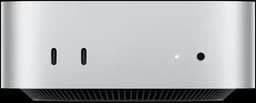
Apple M4 • 10-Core CPU • 16GB RAM • 256GB SSD
We are currently unable to accept individual orders. We are focusing on bulk orders to serve you better.
Looking for Bulk Orders?
For bulk orders (10+ devices), please contact our support team directly. We offer custom pricing and dedicated support for enterprise and team needs.
Get Notified When Orders Reopen
Leave your email below and we'll notify you as soon as individual orders are available again.
From indie developers to enterprise teams, our self-hosted macOS runners power every stage of your development lifecycle.
Compile iOS and iPadOS apps on real Apple Silicon. Xcode builds complete in minutes, not hours. Support for Swift, Objective-C, and SwiftUI projects.
Run automated test suites on actual Mac hardware. XCTest, XCUITest, and snapshot testing with accurate results — no simulator quirks.
Build cross-platform apps with Flutter or React Native on Apple Silicon. Native compilation for iOS targets with M4 chip acceleration.
Continuously test and build Swift packages across multiple Xcode versions. Ensure compatibility with swift build and swift test on real hardware.
Automate your App Store submission pipeline. Build, sign, upload, and distribute via TestFlight or App Store Connect — fully automated.
Run UI tests and capture automated screenshots for App Store listings. Real GPU acceleration means pixel-perfect rendering on actual hardware.
Common questions about self-hosted macOS runners for GitHub Actions and CI/CD pipelines.
After provisioning your Mac Mini, SSH into the server and download the GitHub Actions runner package. Run the configuration script with your repository or organization token, then start the macOS runner as a service. The entire process takes about 10 minutes. Our documentation provides step-by-step instructions for setting up a self-hosted macOS runner on each CI/CD platform.
A self-hosted macOS runner is a Mac machine you control that executes CI/CD jobs for platforms like GitHub Actions, GitLab CI, and Jenkins. Unlike cloud-hosted macOS runners with shared resources and per-minute billing, a self-hosted macOS runner on dedicated Apple Silicon hardware gives you full control, consistent performance, and predictable costs. This guide explains why dedicated Mac Mini servers are the ideal self-hosted macOS runner for iOS and macOS CI/CD pipelines.
The Apple M4 chip in Mac Mini represents a paradigm shift for macOS runner performance. With a 10-core CPU featuring high-performance and efficiency cores, unified memory architecture, and hardware-accelerated compilation, your self-hosted macOS runner completes Xcode builds in a fraction of the time compared to GitHub-hosted macOS runners or virtualized environments. The unified memory architecture is particularly impactful — large Xcode projects that require 8-12 GB of memory during compilation benefit from the M4's 16-24 GB of unified memory with zero-copy data sharing between CPU and GPU. This eliminates the memory bottleneck that plagues shared macOS runners.
GitHub-hosted macOS runners and cloud runners from CircleCI or Bitrise offer convenience but come with significant trade-offs. Shared resources mean inconsistent build times, limited concurrency leads to queue bottlenecks, and per-minute pricing creates unpredictable costs. A self-hosted macOS runner on a dedicated Mac Mini eliminates these issues entirely. With dedicated hardware, every build gets 100% of the CPU, GPU, and memory. There's no queuing behind other projects, no cold-start penalties, and fixed monthly pricing means you can run your macOS runner continuously without watching your bill. For teams running more than 2,000 build minutes per month, a self-hosted macOS runner typically saves 40-60% compared to GitHub-hosted macOS runners.
Setting up a Mac Mini as a self-hosted macOS runner is straightforward regardless of your CI/CD platform. For GitHub Actions, install the self-hosted runner application and register it with your repository or organization — your macOS GitHub Actions runner will be ready in minutes. For GitLab CI, install GitLab Runner with the shell executor to create a macOS GitLab runner. For Jenkins, configure the Mac as a build agent using SSH. Fastlane runs natively on your macOS runner — simply install it via Bundler and configure your Fastfile. The key advantage of a dedicated macOS runner is full SSH access, which means you can install any CI/CD agent, any Xcode version, any dependency manager, and any custom tooling your pipeline requires.
To maximize the performance of your self-hosted macOS runner, consider these best practices: use derived data caching to avoid recompiling unchanged modules, enable parallel testing with xcodebuild's -parallel-testing-enabled flag, leverage Fastlane's built-in caching mechanisms, and configure your macOS runner to clean build artifacts between runs to prevent disk space issues. For teams with multiple projects, consider running separate build agents on a single macOS runner using different user accounts, or scale horizontally with multiple Mac Mini instances as additional self-hosted macOS runners.
A self-hosted macOS runner on a dedicated Mac Mini provides the perfect balance of performance, cost, and flexibility for iOS and macOS development teams. Whether you're an indie developer looking for a faster macOS GitHub Actions runner or an enterprise team managing complex multi-project pipelines, a dedicated Apple Silicon macOS runner delivers consistent, fast, and reliable build infrastructure.
Set up a self-hosted macOS runner for GitHub Actions in under 15 minutes. No contracts, cancel anytime.